As anyone even casually checking will have noticed, prices for GPS units have dropped steadily over the last few years. One month ago, I came up with enough excuses to convince me that a GPS was in my future. I’ll save the details and comparisons for another post (maybe), but the point is that I bought a used Garmin nuvi 760. Now the question was how could I use it for flying?
Although it is now discontinued, the 760 got some very good reviews, and actually I have been very happy with it so far. One very nice feature about most GPS units is the ability to load the track a unit has travelled into a computer. For instance, Google Earth knows how to talk to most Garmin/Magellan models, and can draw a red line on the image of the earth, showing every street and turn that was made.
Last week I was about to go on a flight, and it occurred to me that even though the nuvi 760 is meant for road vehicles, it might be able to record altitude data as well as latitude/longitude. If so, I might be able to record an entire flight, then view it in Google Earth in 3D. Cool idea - I had to try it :)
I took the unit with me on a flight, and loaded its log into my computer when I got home. Wow! It totally worked - here’s a screenshot of what I saw. Try loading this KMZ file on your own computer and viewing it in Google Earth.
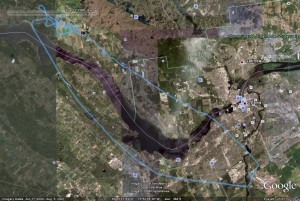
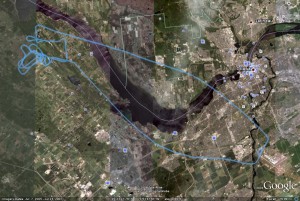
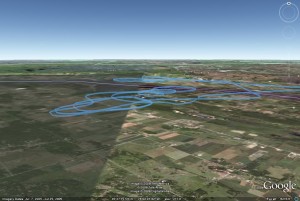
Okay, well that wasn’t the greatest example since I was only doing stalls and steep turns, neither of which make the plane go up and down very much. The next flight, which happened to be later the same day, was a lot more interesting because of the simulated engine failures. Here’s a picture of that flight, and here is the file with the data, so you can see how it looks in 3D.
Potential Uses
From the point of view of a student pilot, I think there are a few ways viewing one’s track after a flight is useful.
First, the most important consideration when making an emergency landing in a field, second to surface type, is available surface length. According to the ruler tool in Google Earth, the field I was circling in the second picture above was 2500 feet long. That distance happens to be more than enough for a Cessna 150, but if it was shorter than 2000 feet, I would know I need to get better at judging length from the air.
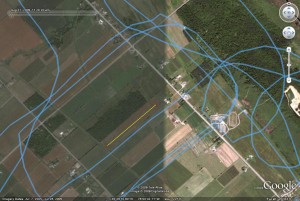
The second reason is similar to the first. From the air, a field may be quite obvious, and stand out so locating it is easy. From the road, however, finding the same field is probably going to be futile. One advantage of having the flight stored in a GPS is clearly the fact that it becomes simple to retrace a flight from the ground. Once the field has been found, it can be looked over to verify that everything was as it seemed from the air. Again, the benefit is an improved sense of what’s on the surface.
Finally, when on a cross-country flight, the winds are never quite as forecast, and corrections have to be made so that the plane’s course matches the intended track. After returning from a trip, the logged data can be compared to the desired track to show the amount of error.
Summary
Naturally, there are special aviation GPS units, both permanent and portable, that would be useful during a flight as well as after. Some of the neat things they can do include showing surrounding airspace, doing complicated instrument navigation, and displaying information on nearby airports. The inevitable downside to these units is their price - simple models run $700-$1000, and can easily get into thousands. If and when the time comes for me to buy an expensive model, so be it. For now, though, I’m doing just fine with a used sub-$150 unit.
Okay, to wrap up, I have been trying to think of reasons to log every flight and post the data to this website. I really just can’t come up with any point to it, so for now I won’t except for important flights like my flight test (don’t worry, I leave the GPS in the back of my seat so there is no distraction). If you think the data would help you or others, please add a comment below.
Thanks for reading, and as this is a Monday I’ll add “Have a good week!”